With ST4's new option to have filenames parsed when a track is imported, I've updated my process and thought I would share in case it might help someone else here.
The problem with parsing the filename is that for it to work properly, each filename needs to be changed to fit the desired format and function for each track. It would take almost as much time to enter the filenames manually as it would to just organize the tracks manually in ST4.
The thing is, there's definitely a pattern on how I organize my tracks, Click is always bus 1, Cues are always bus 2, etc. So I've automated the process as best as I can. I should mention that this is on a Windows computer, but I'm sure it can be adapted for Mac.
Creating my tracks
The DAW that I use is Ableton to get my tracks in order, including creating a cue track. When I select the tracks and export them, I add a " -" at the end of the song name and Ableton adds the track name to the end of the file name. So track 1 in Ableton becomes "Folsom Prison Blues - Click.mp3", track 2 becomes "Folsom Prison Blues - Cues.mp3" and so on.
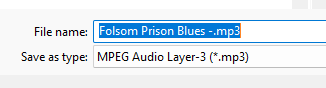
Name Format
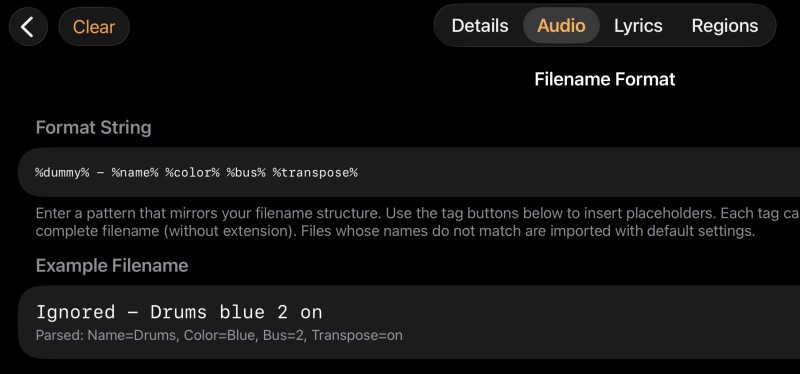
In ST4, I input the "Format String" that I'm going to use. I use the %dummy% tag in place of the song name, and use the "-" as the character that identifies where the song name ends. This means that I can't use that "-" anywhere else in the filename. Here's my Format String:
%dummy% - %name% %color% %bus% %transpose%
Songname - Trackname Color Bus Transpose
Folsom Prison Blues - Click yellow 1 off
Trackname: Click
Color: Yellow
Bus: 1
Transpose: Off
The Script
Now I just need to append all of my track filenames with the correct info with a little script: a simple Python script written with the help of Gemini. All that the script does is take a filename and figure out the last word, and then based on that last word it appends the filename according the the rules I've specified. If the last word is "Click" then it adds " yellow 1 off" to the end of the filename. "Folsom Prison Blues - Click.mp3" becomes "Folsom Prison Blues - Click yellow 1 off.mp3"
rename_files.py
import os
import sys
# Define your rules here: {"Last Word": "What to append"}
# Note: Do not include the file extension in the "Last Word".
RENAME_RULES = {
"Click": " yellow 1 off",
"Cues": " yellow 2 off",
"Drums": " gray 3 off",
"Percussion": " gray 5 off",
"SFX": " gray 5 on",
"FX": " gray 5 on",
"Bass": " purple 4 on",
"Guitar": " red 5 on",
"Guitars": " red 5 on",
"Muted": " red 5 on",
"Clean": " red 5 on",
"Distorted": " red 5 on",
"Strummed": " red 5 on",
"Electric": " red 5 on",
"Electrics": " red 5 on",
"Lead": " red 5 on",
"Rhythm": " red 5 on",
"Acoustic": " red 5 on",
"Acoustics": " red 5 on",
"Dobro": " red 5 on",
"1": " red 5 on",
"2": " red 5 on",
"Lead": " red 5 on",
"Steel": " red 5 on",
"Pedal": " red 5 on",
"Arpeggio": " red 5 on",
"Keys": " green 6 on",
"Piano": " green 6 on",
"Organ": " green 6 on",
"Synth": " green 6 on",
"Synths": " green 6 on",
"Hits": " green 6 on",
"Harpsicord": " green 6 on",
"Ambient": " green 6 on",
"Strings": " teal 5 on",
"Fiddle": " teal 5 on",
"Flute": " teal 5 on",
"Marimba": " teal 5 on",
"Horns": " orange 7 on",
"Sax": " orange 7 on",
"Harmonica": " orange 7 on",
"Bgv": " blue 8 on",
"Vocal": " blue 9 on",
"Vox": " blue 9 on",
}
def rename_files(file_paths):
for path in file_paths:
if not os.path.exists(path):
continue
# Split the path into directory, filename, and extension
directory, full_filename = os.path.split(path)
filename, extension = os.path.splitext(full_filename)
# Get the last word of the filename (splitting by spaces or underscores)
# Replacing underscores/hyphens with spaces makes splitting cleaner
normalized_name = filename.replace("_", " ").replace("-", " ")
words = normalized_name.split()
if not words:
continue
last_word = words[-1]
# Check if the last word matches your rules (case-insensitive)
for key, append_text in RENAME_RULES.items():
if last_word.lower() == key.lower():
new_filename = f"{filename}{append_text}{extension}"
new_path = os.path.join(directory, new_filename)
try:
os.rename(path, new_path)
print(f"Renamed: {full_filename} -> {new_filename}")
except Exception as e:
print(f"Error renaming {full_filename}: {e}")
break
else:
print(f"No match for: {full_filename} (Last word: '{last_word}')")
if __name__ == "__main__":
# sys.argv[1:] contains the list of file paths dragged and dropped
if len(sys.argv) > 1:
rename_files(sys.argv[1:])
else:
print("No files provided. Drag and drop files onto the batch shortcut.")
# Keeps the window open so you can see what happened
input("\nPress Enter to exit...")
At the top of the script you can edit the rules to fit your needs.
Multiple files at once
In order to do multiple files at once, I created a batch file and put it in the same folder as my script.
DropFilesHere.bat
@echo off
rem %* passes all dropped file paths straight to the Python script
python "%~dp0rename_files.py" %*
Next, create a shortcut to this batch file (right click, create shortcut). Then I placed this shortcut onto my desktop.
Now, all I have to do is drag and drop my files onto the shortcut and they're all renamed and ready to import into ST4.
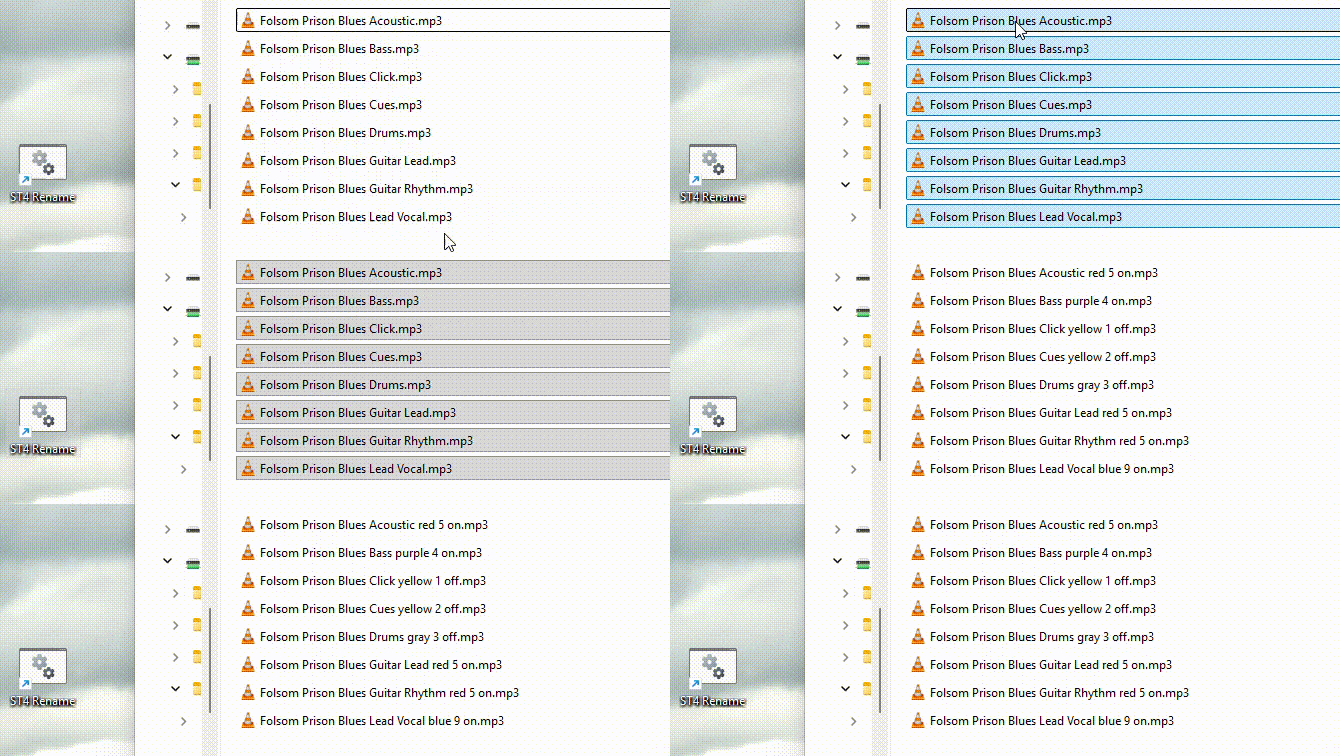
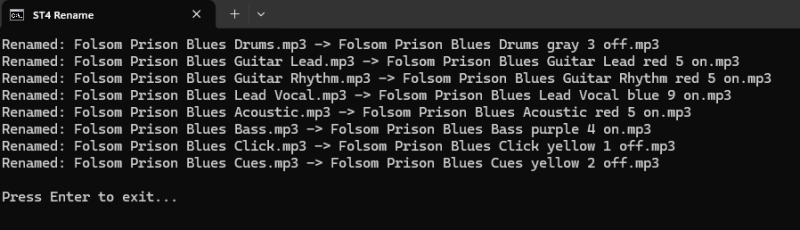
(I used old files when I created these screenshots and forgot to add the " -" into the filenames. Pretend they're there 🙂 )
My process now:
- Export tracks from Ableton
- Drag and drop track mp3 files onto my desktop shortcut to rename them
- Add the tracks into ST4
- Reorder the tracks in ST4 by bus
It would be really nice if ST4 would sort the tracks on import (when doing multiple tracks at once) by bus number so I wouldn't have to rearrange them manually, but that's not a huge deal 🙂