Damir
Thanks for your msg. Yeah it is kinda frustrating. But as an ex-programmer, I can sympathise with @Peter dilemma.
He is grappling with the shortcomings of the OS. It would seem that Apple are trying to convince us all that touch tablets and pinch gestures are the future. Which is kinda ironic given that Apple pretty much brought Mouse use to the masses.
However, trying to remain positive, having used Ableton for many years, they clearly have faced the same issues and have come up with a really neat way of dealing with it.
They have a 'NavigationBar' (I think that's what they call it) across the top of the area being worked on in their 'Arrangement View'; (Essentially a TimeLine). The nav bar is an 'overview' or birds-eye view of the entire timeline.
You can mouse over that overview at any point and click & drag down to zoom in to the spot where your mouse is in the overview. And super useful, the current playhead position is marked on the overview bar with a simple black line. So simply drag down on the overview where the black line is and your current playhead position zooms in.
Also, click/drag up and the view zooms out. Very neat, super easy and very very useful.
Here are a couple of screenshots of said overview.
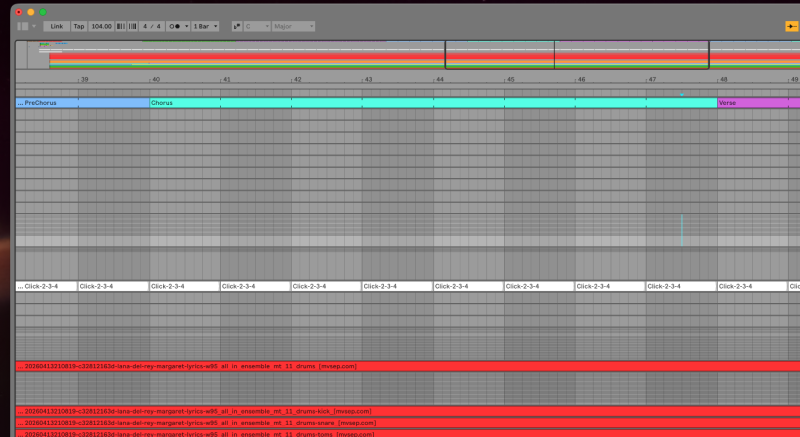
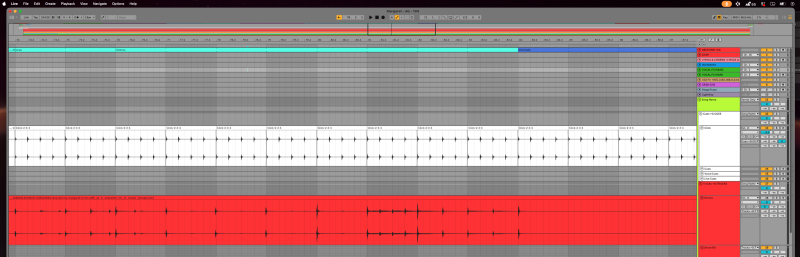
The playhead position is the thinner black line, the two thicker lines mark where the main view is within the overall timeline.
All of this could work for the waveform in the region editor (I would think) and would place zoom control within the control of Peters programming and not be reliant on awkward and difficult (and subject to change by (Gr)Apple) system settings.
One last thing, most DAWs use this approach in some way or another. Presumably to get around the OS limitations? Anyway, other notable DAWs use other options such as click and drag on the time bar above the editor (IE there is no 'birds-eye view) which works fine too. And as ST has just such a time bar, maybe that would be an easier/quicker solution?
Just a thought
@peter
If you are interested in looking into this (I hope so) I would be happy to provide further info on the Ableton interface; Images, Videos etc
Chers all
Mark

