I have an X32 and do multitrack audio routing.
First, read the manual 🙂 https://stagetraxx.com/docs/v4/settings/audio/audio-settings/#bus-setup
ST4 introduced a new 'layer' between the track -> audio interface input routing of ST3.
We now have: Tracks -> Buses -> Audio Interface inputs
When you connect your X32 and go into Settings -> Audio Settings and scroll down to the 'Bus Setup' section you will see where you route each Bus to each X32 input (either individual or as stereo pairs).
You need to setup your Bus routing. This will be remembered for every time you reconnect to the X32.
E.g. this is my own setup:
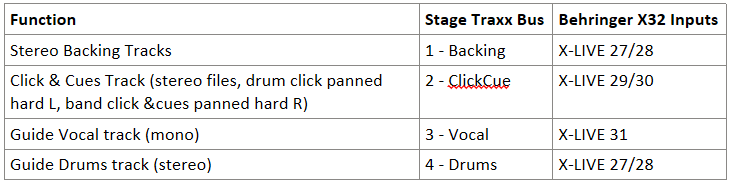
Then in each Song, when you go into Song Information -> Audio and then into each track, you will see the Track -> Bus routing options.
https://stagetraxx.com/docs/v4/song-details/audio/track-details/
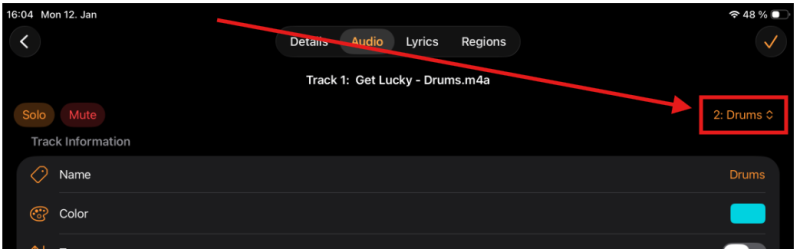
@peter it's only just occurred to me that there is no label or other indication for the Bus selector on this page? I know it's obvious when you already know, but maybe for new folks it needs a label? Also, maybe the docs needs a high-level audio routing overview (similar to the interface overview section) that goes over the high level concepts?
